Progress Update on Removing Ads from the 'Masjid As-Sahabah' YouTube Channel
29 April 2025 • 12.2K views
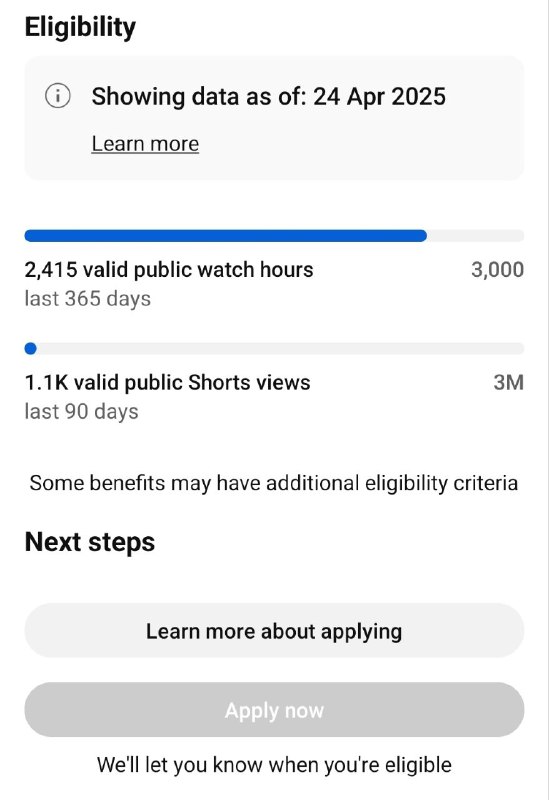
In line with our commitment to shielding viewers from inappropriate or distracting ads, we've taken all necessary steps to ensure our videos are ad-free.
We've met most of the eligibility criteria, and inshaAllah, once we reach 3,000 public watch hours, the ads will be removed.
----
How to Watch YouTube Videos Without Ads – Tips & Tools
1⃣ Mozilla Firefox:
If you have the Firefox browser on Android, look for the add-on “uBlock Origin.” It’s a reliable and safe tool that blocks all ads—including YouTube ads. It’s also available for Chrome and Firefox on PC. iPhone users can install the “Brave” browser, which effectively blocks YouTube ads as well.
(Credit: Salman)
2⃣ NewPipe (Android Only):
NewPipe is an open-source app and a safer alternative to YouTube Vanced. It has no ads, supports background playback, no need to sign in, and allows direct video downloads**—a complete solution.
Download it from:
- https://newpipe.net/
- https://f-droid.org/ (A trusted store for secure, open-source apps)
(Credit: Salman & M. Salvan)
3⃣ YouTube Vanced:
Another app that lets Android users watch YouTube ad-free.
(https://m.apkpure.com/youtube-vanced/com.vanced.android.youtube/download)
(Credit: Abu Yusuf)
Addition (Credit: Abu Abbad)
Another suggestion for YouTube video playback is Revanced Extended (RVX). Vanced has been discontinued, Revanced is the closest option that's still supported but has less features than the extended version.
https://www.reddit.com/r/revancedextended/s/Se35IZLAoV
It offers the most customisability from what I've seen. Some useful features include the ability to change your home screen to the subscription screen, so you don't see any thumbnails or video suggestions you don't want to see. You can also hide recommended and related videos so you don't see anything other than content from the channels you are subscribed to, throughout the app. Like Revanced, you can disable shorts and ads but you can go a step further by removing sections from your feed like the "Movies" shelf and you can even add keyword filters so you don't see videos that contain certain words. Sponsorblock also skips ads that are within the videos but aren't official YouTube ads and can also be fine tuned to skip things like promotions. All these options can be found under Settings > RVX.
4⃣ Online Ad-Free Playback:
Simply paste a YouTube video link into this website to watch it without ads:
(https://safeshare.tv/my/add)
(Credit: Abu Rayyan Al-Hindi)
5⃣ Ad Personalisation Settings:
You can also go into your Google account settings and adjust ad personalisation to block or filter specific types of ads.
---
Advice:
Videos will continue to be uploaded on YouTube to reach the wider audience already there. However, you know yourselves best. If you find it hard to avoid harmful content or distractions on YouTube, now you have several safer alternatives to benefit from the knowledge without the fitan.